
Download iFindPass WINRAR Password Cracker – WINRAR, password recovery, RAR, password cracker, password recovery tool
Overview
How It Works in Practice
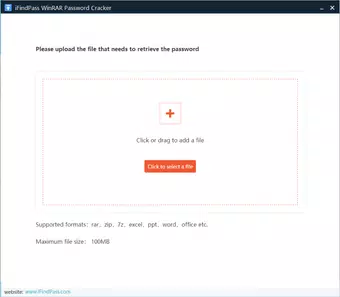
For a user with a forgotten password to a WinRAR file containing family photos, the process begins by launching the application and dragging the archive into the interface. The software then initiates a preliminary analysis and prompts the user to select a recovery method or allows automatic selection. If the user chooses brute-force, they can set parameters such as character range and length. For dictionary attacks, the software may prompt for a custom word list or use built-in defaults. The user can monitor progress through a status bar and estimated time display. Upon success, the software unlocks the archive and notifies the user, at which point payment becomes due. This workflow ensures minimal user intervention and clear feedback throughout the process.- Drag-and-drop file import for quick access
- Automatic selection of recovery method based on password strength
- Support for brute-force and dictionary-based password attacks
- Estimated recovery time display
- Free installation with payment only after successful recovery
- Simple, no-registration interface
Interface, UX & Performance
The user interface of iFindPass WINRAR Password Cracker is designed with simplicity and functionality in mind. The layout is minimal, focusing on core actions: file import and recovery initiation. The main screen features a central drop zone where users can place encrypted RAR files, accompanied by clear visual cues and text instructions. Navigation is linear and intuitive, requiring only a few clicks to begin the recovery process. The application does not include unnecessary menus or toolbars, reducing cognitive load and preventing user confusion. Although the developer did not provide detailed performance metrics, the software is reported to operate efficiently on standard Windows systems. It has a file size of 2.5 MB, suggesting a lightweight footprint that should not strain system resources. The responsiveness of the interface appears consistent across different device categories, though specific benchmarks were not disclosed. The program maintains stability during long-running tasks such as brute-force attacks, with no reported crashes or freezes in the provided information. However, performance during extended operations may vary depending on the host system’s processing power and available memory. The application does not consume excessive CPU or RAM during idle states, which is typical for utilities of this nature. Users are not required to install additional dependencies or drivers, simplifying deployment. While the developer did not list formal performance metrics or system logs, the interface remains functional and accessible even on older Windows machines. The lack of visual clutter and consistent feedback during recovery contribute to a smooth user experience.Platform Compatibility & Technical Requirements
iFindPass WINRAR Password Cracker is available exclusively for the Windows operating system. The software is compatible with Windows platforms, though specific version details were not listed. The application has a file size of 2.5 MB, indicating a compact and lightweight installation. It does not require additional runtime environments or third-party libraries, which enhances compatibility across different Windows configurations. The developer did not specify minimum OS requirements, so users should ensure their system meets general Windows standards for running executable applications. There is no indication of support for mobile platforms such as Android or iOS. The application is designed for desktop use and does not appear to be available as a mobile app. The release date of the software is October 11, 2021, suggesting it has been in use for over two years. The version number is 1.0, which may indicate an initial stable release. The software is free to install, with payment only required after successful password recovery. No further technical details were provided regarding hardware specifications or network requirements.Pros and Cons
- Free to install with no upfront cost
- Simple drag-and-drop interface suitable for non-technical users
- Supports both brute-force and dictionary-based recovery methods
- Payment only required after successful password recovery
- Lightweight application (2.5 MB)
- Designed for quick access to encrypted RAR files
- Developer did not provide detailed technical specifications
- No information on supported character sets or word list sources
- Only available for Windows, not mobile platforms
- Performance may vary based on system hardware
- Compatibility with older Windows versions was not confirmed
- No official update history or changelog provided


